Chapter 8Photos and video into 3D
Chapters 6 and 7 start from things that are already numbers: a Splash's recipe, a table, a catalog of stars. A photograph is not. It is a flat grid of colors with no depth, and a video is that grid thirty times a second. This chapter is about the ways Splashery gets 3D out of them, from the cheapest guess to a full reconstruction, and about what it can and cannot promise. The tools here are on the Studio shelf and behind the labs switch; the photoreal captures are on their own shelf, partly open.
3D Photo
What it is. Open a photo and get a Splash you can turn: near things move across far things as you turn it. It is a depth effect, a guess, not a scan: from one picture there is no way to know what is behind a tree.
How Splashery does it. A depth model works out, for every part of the picture, how far away it is. The model is Depth Anything V2 Small [13]. Where the browser has WebGPU with 16-bit shaders (shader-f16), it runs on the graphics chip in half precision: a file of 49.6 MB plus a 26.8 MB WebGPU runtime, about 77 MB the first time, which 3D Video shares. Without them it runs in its 8-bit quantized form, a file of 27.3 MB (plus a 14.2 MB runtime) through ONNX Runtime Web on one thread. (Sharing memory between threads needs the page to be cross-origin isolated, which takes headers from the host; without them the runtime has just one thread.) Both files are Splashery's own, served from the site; nothing is fetched from anywhere else and your photo is not uploaded. They load only when you open a photo of your own. The sample pictures on the Splash come with their depth maps already worked out, so they need no model at all. Some samples are AI pictures by Ryan Kamp; each says so beside it, with the model that made it (see the site's credits in "How Splashery is built").
With WebGPU, the picture goes to the model at two sizes. At 518 pixels on the long side, each side a multiple of 14 (the model reads the picture in 14-pixel tiles), the model gets the layout right; at 1,022 it gets finer edges, such as thin stems and leaves. The finer map is fitted to the 518 one, and the result takes the 518 map's difference from it smoothed over 1/48 of the picture. If the graphics chip's buffers cannot hold the finer run, its size steps down (868, then 700, then none), and a failed fine run keeps the 518 map. Without WebGPU only the 518 run is made. On a MacBook Pro M3 Pro the model takes 294 to 314 milliseconds. The answer is a smooth map of relative depth: it says which parts are nearer than which, not how many meters. The photo is then rebuilt as splats. Each splat sits at its place in the picture and at its depth, colored from the photo, and sized to its neighbors on its own surface so the surface closes. A grid that adapts to the picture spends the splats where there is detail: a plain block of a wall is one big splat, and a block of letters splits into four, and again, down to single pixels, until the budget is spent. The budget is the tier's default count times 1.5, capped at the tier's maximum: 90,000 splats on a low device, 210,000 on a mid one, 300,000 on a high one, and 400,000 on the highest, at the default Splats count (the Splats slider changes them). In the splat view, where the depth jumps between two neighbors by more than 0.015 of its range, the surface is cut, so a near object stands as its own layer and does not smear into the wall behind it. The picture is split into four depth layers, and a tap lifts them apart one at a time.
Why this way. The depth model needs only one photo and runs on the device, which fits a site with no server. The price is the model's guess. Splashery has no model that paints what the camera did not see: behind a near thing it copies in the far side's own pixels (What a turn shows, below, says how far).
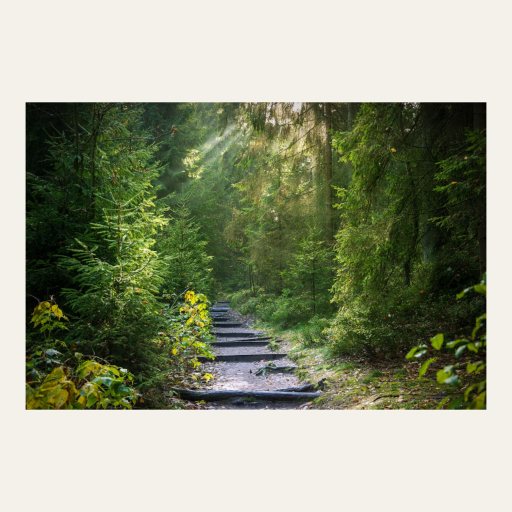
The Sharp view (the default)
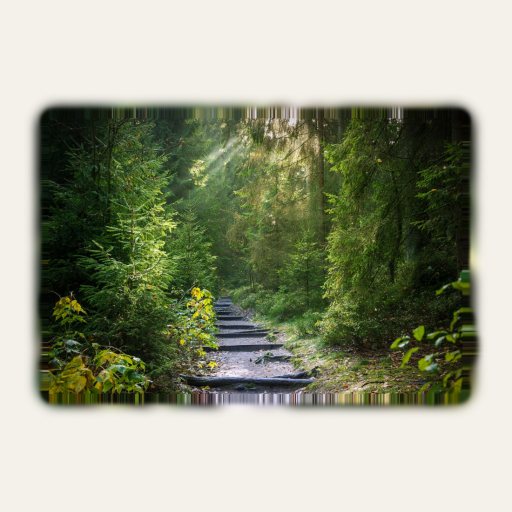
The splat view
The Sharp view
What it is. Splats are soft by nature, and a photo of a page of small print loses its letters when it is drawn as 200,000 soft blobs. The Sharp view is a second view of the same Splash that keeps the photo at its full resolution.
How Splashery does it. The photo is laid as a texture on a relief: a surface lifted by the same depth the splats use. It is a textured surface, not splats. The depth slider, the tap, the layers, the sway, and, for a clip, play, pause, and scrubbing all move the relief as they would move the splats. A switch in the Splash's panel chooses Sharp or Splats, and the choice is saved with the scene, so a shared link opens in the view it was saved in. A scene saved before the switch existed opens in Sharp. Where splats are needed, they show instead and the panel says so: while an effect from the Effects sheet is on, because effects work on splats. The Sharp picture comes back after. Saving the Splash as a splat file is unaffected, since it reads the splats.
Why this way. Splashery is primarily splat-based but not entirely splat-based, and this is the clearest place it is not. The Sharp view is there because splats are the wrong tool for reading small text, and because the Splash is still the same Splash: the same depth, the same controls, the same saved link.
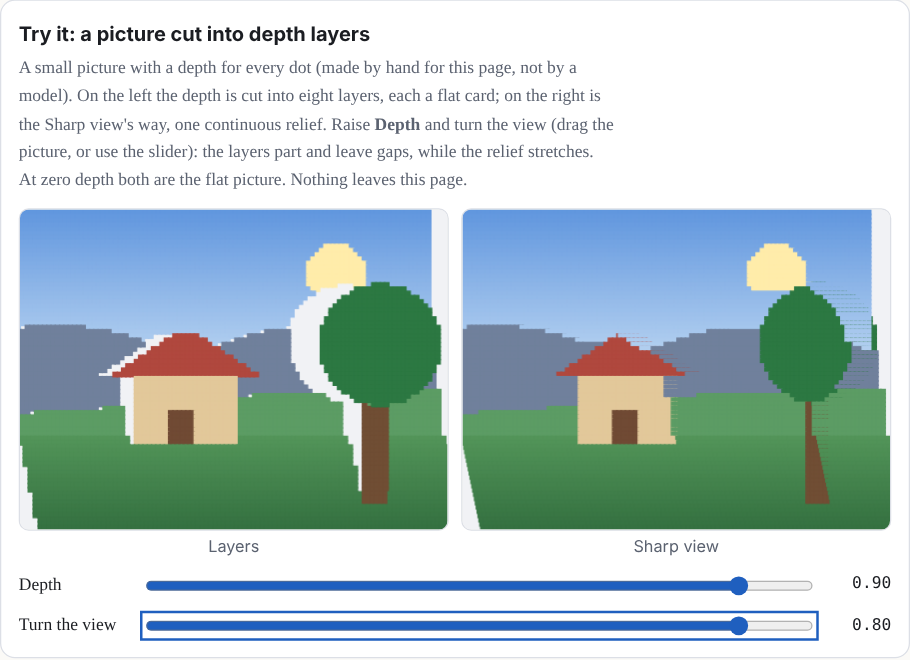
Try it: a picture cut into depth layers
A small picture with a depth for every dot. On the left the depth is cut into eight layers, each a flat card; on the right is the Sharp view's way, one continuous relief. Raise Depth and turn the view (drag the picture, or use the slider): the layers part and leave gaps, while the relief stretches. At zero depth both are the flat picture. Nothing leaves this page.
What a turn shows
What it is. Open a photo of your own and it shows at once, flat, while the status ring beside the pill says "Working out the depth…" (and the model's loading steps while it downloads), with nothing over the photo. When the model is done, the photo is built again with its depth. The Splash starts flat, and a tap raises it; the Depth control sets how far, from a flat picture to the deepest relief. Turn the photo, and the part that was hidden behind a near thing comes into view.
How Splashery does it. In the Sharp view, 3D Photo fills in behind each near thing from the far side of the step just behind it: the far side's own pixels, carried in as far as a 60° turn can uncover at the current Depth, copied and never blended, at the far side's own depth. A pixel behind a near thing takes the pixel on the far side as far beyond the step as it is behind it, mirrored across the step and out to the picture's border; where none is found, a push-pull fill of the mirrored pixels around it covers the spot. Past 60°, a near thing's own pixels would show again on the backing, a ghost of it beside itself, so they take the far side's colors, mirrored the same way, and the backing is kept inside the picture's outline. There is still no model that paints what the camera did not see: every pixel on the back layer is a pixel of the photo. Nothing limits how far the photo turns, tilts, zooms, or moves at the top Depth.
The Sharp view shows no smeared backing and no black gaps. Head-on, 0.1 to 0.9% of the picture is backing (measured on a MacBook Pro M3 Pro), and the cuts flicker little as the view moves. The cut at 0.015 of the depth's range, earlier in this chapter, belongs to the splat view.
Sound. A tap plays the sound you choose in the Splash sheet: Paper, Soft chime, or Use my own sound…. Your own sound stays in the page's memory, never in a link.
3D Video
What it is. The same idea for a GIF or a short video: it plays back in 3D, each frame lifted by its own depth. The Clip menu has ten samples with their depth worked out ahead of time, so they need no model. Five are short: Big Buck Bunny (six seconds, the bunny and the butterfly; © Blender Foundation, CC BY 3.0), Galloping horse (1887), which is a GIF, Sintel and the dragon, The bridge and the robot, and Inside the machine. Five are longer: Big Buck Bunny: 30 seconds; Sintel: 30 seconds, which the Splash opens on (© Blender Foundation, CC BY 3.0); Inside the machine: 30 seconds; The bridge and the robot: 27-second city montage; and Camping in the woods: 30 seconds.
How Splashery does it. For a GIF (its first 8 seconds) or a video of 8 seconds or less, it takes the frames at the rate and size Detail sets: 12, 15, 24, and 24 a second at Low, Mid, High, and Max, each frame sized to about 60,000, 140,000, 200,000, and 230,400 pixels. The Splash opens as soon as a first depth is made on a few frames, and then the depth is worked out for every frame, in a depth worker, so the page keeps drawing at 44 to 60 frames a second while it works (measured on a MacBook Pro M3 Pro). Where the browser has WebGPU, each frame is read at 392 pixels on the long side (294 at Low) and its depth is kept in 16 bits; without WebGPU the work takes longer but still ends with the depth on every frame. The depths are lined up between the shot's keyframes, around a convergence plane (the depth that stays put as the view turns), so the depth holds steadier from frame to frame. The colors carry the motion. A video plays with its own sound and its frames follow that sound's clock. The depth is smooth, since the model guesses shapes and not edges, so it is sampled smoothly up to the frame's size and its edges are cut clean.
A video longer than 8 seconds plays whole instead. Its depth is streamed just ahead of the picture, at 392×224 for a 16:9 video (294×168 at Low), as fast as the device keeps up (24 answers a second on the M3 Pro), into a ring of 105 answers in 16 bits: a second, muted copy of the video plays 1 to 2.5 seconds ahead and hands each frame to the depth worker. Memory stays the same however long the video is: its depth takes 18.4 MB at any length (10.4 MB at Low). Each draw takes the frame on show once and finds its depth by that frame's timestamp, so a moving thing's outline stays on its picture (every picture is drawn with its own frame's depth). Each answer is settled by a mean over the 6 answers on each side that blends only where the picture's color agrees, so an outline holds still. The colors come from the playing video. It has the Sharp view too.
Watch your screen in 3D. On a desktop, 3D Video can show a screen you share, live. The browser asks which screen or window to share, the frames go to the depth worker as they arrive, and the newest depth is held with the newest picture: 32 answers a second at 392×224, with the page at 60 frames a second and the depth about 60 milliseconds behind the screen (on the M3 Pro, at Mid; at Low the depth is 294×168). The picture is drawn sharp, at the display's pixel ratio, and the relief is not cut, so text stays readable. Phones cannot share a screen, and the Splash says so.
3D World
What it is. 3D Photo guesses depth from one picture. This Splash does something different and harder: it takes many views of a still scene (the frames of a video that walks or flies around something), works out where the camera was for each, and trains a real 3D Gaussian splat scene that looks right from each of those places. It is the method of Chapter 1's first reference [1], running in your browser. A scene that stands still works. A moving car or person blurs or vanishes.
How Splashery does it. It uses Splat.js [21], an
MIT-licensed library vendored in vendor/splatjs/ and loaded only when you open
a video in this Splash. The Splash first picks the sharpest frame in each window of the
stretch you choose. Splat.js then works out the camera's path (it finds features, matches
them between frames, registers each camera, and adjusts them all together), seeds a splat
cloud, and trains it on the graphics chip through WebGPU: the splats' places, sizes, colors,
and opacities are nudged by gradient descent until the scene renders like each frame. The
result is shown as the Splash's splats, and you can turn it, zoom, save it as a PLY, or tap
Replay flight to fly the video's own camera path with its sound. While it works, the
status ring's card shows each stage and how far it has come, with Stop. During training the
card also shows the preview, once there is one, and Stop becomes Finish now, which
ends the run and keeps what has been trained so far.
How much it does depends on the device. A mid-tier device uses up to 32 frames at 640 pixels, trains 3,000 steps, and keeps up to 120,000 splats; a high-tier one uses 60 frames, 7,000 steps, and 250,000 splats; the lowest tier, a phone, uses 16 frames, 1,200 steps, and 30,000 splats, with at most 8 minutes of training (it keeps what it has by then; preparing the frames and cameras takes extra time). It needs WebGPU: a browser without it says so rather than starting. The Splash has six scenes, results made the same way from videos under Creative Commons licenses: Statue of Liberty (the Dronalist, CC BY 3.0), Edinburgh walk (POPtravel, CC BY 3.0), Adjara summer forest walk (Vitaly Zdanevich, CC BY 4.0), Lihula stronghold (Sillerkiil, CC0), Toolse castle (Sillerkiil, CC BY-SA 4.0), and Põltsamaa river and castle (Sillerkiil, CC BY-SA 4.0). The full videos are not shipped, only the trained splats, the camera path, and a short cropped clip of each (for Show the original).
Each scene has a recorded flight that plays through this site's camera. The Scene choice picks one of the six, and the Move around choice sets how you move through it. While a flight plays, a one-finger drag turns the view, a pinch or the wheel eases in, and Reset eases your turn and zoom back to the flight's own view.
Why this way. This is the one place Splashery trains a splat scene in your browser. It is honest about the cost: minutes of work on your graphics chip, a result only as good as the video, and no server.
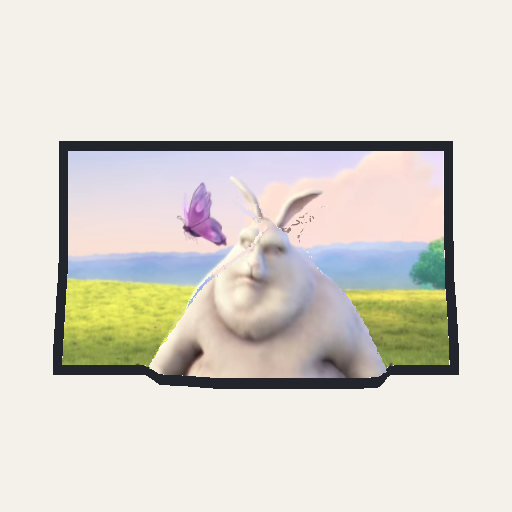
A moving photo
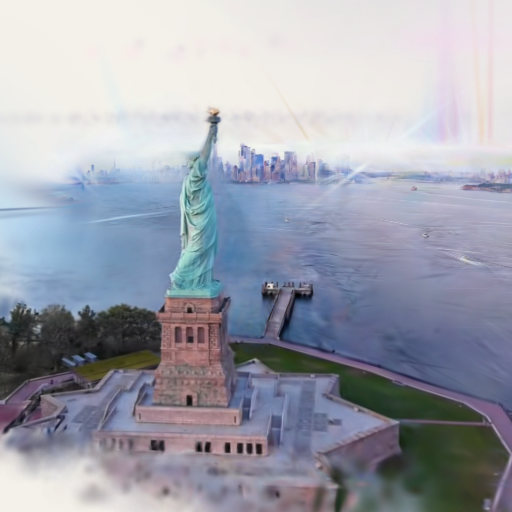
A trained video: the statue sample
360° Photo
What it is. A 360° photo shows everything around one spot, flattened into a rectangle. 360° Photo (Studio, labs) turns one into a room you stand inside and look out of. Its samples are two rooms, the Sunlit room and the Lamplit room.
How Splashery does it. The Splash works out a depth for the photo and builds the room as a shell of splats around you, up to about 1,000,000 of them (the samples are 2048×1024 pixels). Because you stand in the middle, the view turns around you, and a pinch changes how wide a view you take, in degrees, instead of moving you closer. The Sunlit room opens 120° tall (84° across on a phone held upright) and the Lamplit room 140° tall (110° across), and a pinch opens either to 150°. If the depth fails, Retry depth starts it again and keeps the room.
Splat Mirror
What it is. Splat Mirror (Studio, labs) shows the camera as a mirror would, in 3D, as splats or in a Sharp picture. It has 3D Video's Splat colors and Depth over time controls and the same Sharp renderer.
How Splashery does it. The Sharp picture is cut by height: a step in the depth is cut only where it is as tall as a cut at the Splash's default Depth, and fewer steps are cut as Depth goes down. At Depth 0 none is cut, so the picture lies whole and flat, a flat reflection with no holes, on purpose. The Splash sheet keeps the view you chose, Sharp or Splats, through later rebuilds.
The photoreal captures
What it is. The Photoreal shelf holds real objects (Strawberry, Honeybee, Real Sunflower, and Real Bonsai Tree, for example), most of them captured by other people with many photographs and trained into 3D Gaussian splat files, which Splashery converts and shows. Two, the Wind-up Robot and the Felted Fox, are Ryan Kamp's own. Of its 88 Splashes, 80 are captured splat files and 8 are built in the page; 32 are open to everyone and 56 are behind the labs switch until they are ready. A capture is named Real X when the shelf also has a kit-built X (Real Orange, Real Alarm Clock).
Sixteen of the newest captures are behind the labs switch: the Wind-up Robot and the Felted Fox (Ryan Kamp, CC0), and, all CC BY 4.0, the Ship Model (Deutsches Schifffahrtsmuseum), the Typewriter (Kevin Lai), the Vanadinite (Yann de Couëssin), the Rangefinder Camera (Mykhailo Moroz), the Cherry Tree (Garrett Nelli), the Space Capsule (Paolo Tosolini), the Antique Car (SteveB), the Mail Biplane (Paolo Tosolini), the Model Touring Car (Alfred Duemlein), the Classic Sports Car (VODKIN), the Track Car (Jakub Makar), Cochem Castle (Dok11), Smederevo Fortress (Zeljko Devic), and the Perseverance Rover (tmate, a synthetic scene).
How Splashery does it. Splashery does not train these. Each capture arrives as a file
under a license it can use, and a build tool converts it: it decimates the splats, centers
and scales the Splash, and writes a .sog file (a compressed splat format),
usually as a pair, a full file and a lite one for weaker devices. Some captures are cropped
or cleaned up here; each one's credit lists what changed. The viewer opens
.ply, .sog, .splat, and .spz, so it can
also open your own captures. Files can carry spherical harmonics, the view-dependent color
the kit's own splats do not use, and some of the newer captures keep one band of them on the
full file; the page skips the higher bands, which it does not draw, when it downloads. Big
files warn and then thin: a low device warns at 60 MB or 400,000 splats and thins to
300,000, and the highest tier warns at 200 MB or 2,000,000 splats and thins to 1,500,000.
No longer applies: own files open whole. (This is about the last sentence of the paragraph above, "Big files warn and then thin…".)
How a capture opens. While a capture opens on a new file above Low's count, its stage is blurred and dimmed behind a veil, under a small card in the middle of the Splash's band ("Opening the BMX Bicycle") with a bar and the megabytes of the full file so far, and the Splash's shelf picture stands in, blurred, until the stage draws. A light file made from its full file is not downloaded while the capture opens, so the full file starts at once; an older light file, merged by splat-transform, is still drawn first, behind the veil. The veil lifts in a 220-millisecond fade once the full file is drawn and the Splash's rig is on, or at most 600 milliseconds after the file. The Splash tab and the hint line are in place from the first frame; the tab is dimmed until the rig is on. At Low's count a capture opens on its light file, about 100,000 splats, with no veil, and that file stays on show when it holds the whole count; one that holds fewer gives way to the full file in a 400-millisecond cross-fade, so there is no jump in sharpness.
The 300,000-splat files. Each of the 35 captures whose full file holds more than 300,000 splats (the BMX Bicycle 495,006, the Peonies 1,000,000, and the Typewriter 1,110,714 among them) has a 300,000-splat file beside it, 3.4 to 3.9 MB: the page's own pick at that count, in the full file's place. The page reads it in place of the full file when a copy is to hold exactly 300,000 splats, as it does at Mid, High, and Max by default. For any other count the Splats slider or a link asks for, it reads the full file, so the slider still runs to the capture's own count. When the Splats count is below a capture's whole count, the page keeps splats by weight, their opacity times their longest axis, so the large opaque splats that close the surface stay and thin ones count by their length, and each kept splat grows and gets more opaque to cover for the ones left out. Twenty-three captures have light files made to look close to their full files at Low.
Licenses. The 80 captured Splashes carry their credits beside them: 18 are CC0 (two of them Ryan Kamp's own), 58 CC BY 4.0, one CC BY 2.0, and three are NonCommercial (CC BY-NC or CC BY-NC-SA). A capture under a NoDerivatives license, or with no license, is never used. The shelf shows only Splashes whose assets allow commercial use, so those three, and the Stannern Meteorite, whose assets are also NonCommercial, are kept off the shelf, search, Surprise me, and the New list; a link still opens each with its credit. A capture shows what was captured, marks included: a maker's name, a logo, a license plate. Credits show beside each Splash, in the header's credit line and the About sheet, and everything Ryan Kamp made carries his name with the license it already had.
Labels. Some captures carry numbered, labeled points. While Labels is on (a
button in the stage's column that appears only where a capture has points, and starts off),
each point is a numbered marker, 24 pixels across at any zoom. Tap a marker and a panel
opens under the header with the point's title and a short text, with Previous, Next, and
close buttons, while the view glides to the point's own view in 0.8 seconds; the turntable
waits while the panel is open. A marker the capture hides turns faint and takes no tap. The
markers stay when the other controls fade, and ?labels=on opens a Splash with
Labels on. The Typewriter has 5 points, the Ship Model 4, and the Perseverance Rover 22. The
idea comes from SuperSplat's annotations.
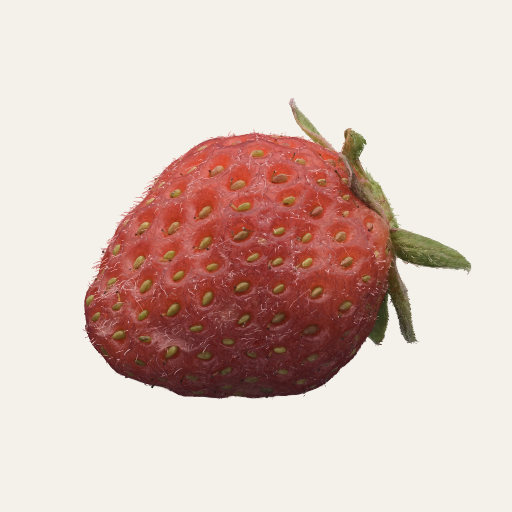
A strawberry
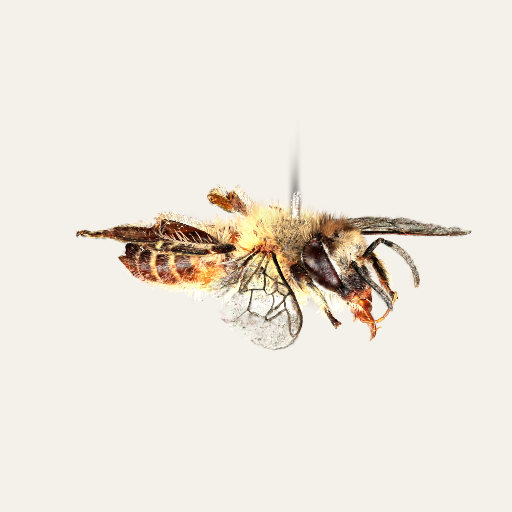
A honeybee
Where to try it
- 3D Photo, 3D Video, and 3D World (all labs; the last needs WebGPU).
- Strawberry, Honeybee, and Grape (open to everyone). The grape has a peel that shows the pale flesh.
- 360° Photo and Splat Mirror (labs); Typewriter, Ship Model, and Perseverance Rover, which have Labels (labs).